
SMS for SmartWatch22.24 - Google Play
You'll be able to see results in few seconds.
Publisher Description
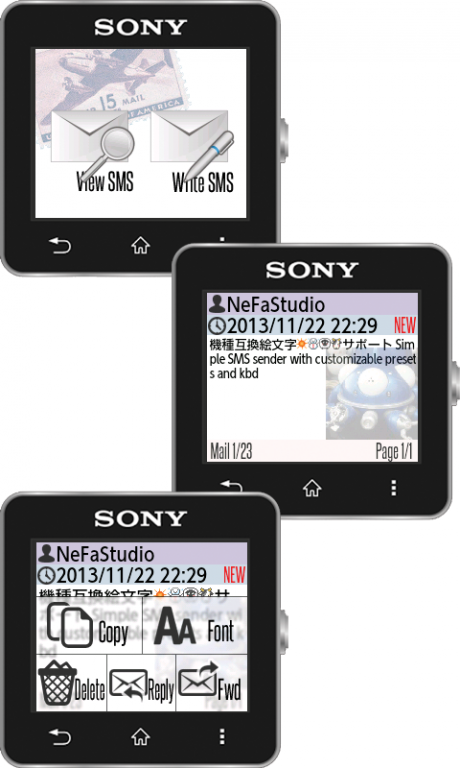
NOTE:You need Sony SmartWatch2 device to use this software.
See Smartwatch2 FAQ and Troubleshooting page for your info:
http://programresource.net/en/2014/03/26/2452.html
Read / Write SMS message (160 character messaging service, sending via phone number). Customizable presets and software keyboard. Useful to quickly send SMS.
Supports Emoji in Japanese Phones. I'm unaware of how picture icons (emoticons) are handled , or special characters are input in other county; if there are detailed information about unicode and emoticons, or input method for your language with numpads, let me know.
Cyrillic input added in v1.7; I'm not a Cyrillic user, I don't know if this is correct. Any report would be helpful (working good/bad).
Notes and Restrictions:
-To ENTER SAME CHARACTER MORE THAN TWICE,, swipe down/up before entering again.
-Update SmartConnect (later than Dec.4th version) for best performance.
-Sending SMS in this app is independent from Mail app you use in Android device. Sent mail will only be saved in this extension.
-This is not a notification extension, will not notify for new mail arrival.
-There might be a case received SMS does not appear in this extension depending on your device.
-SMS will not automatically resend when send fails, please resend manually.
-Copy in menu will copy text to clipboard. May be useful when you are writing text/mail on android device, and want to copy text from older SMS.
-Internet access is used for Japanese Kana-Chinese character translation (uses Google service for this)
FAQ:
Q:Can you add T9 input support?
A:I can't add T9 support due to T9 input patented and licensed by Nuance Communications, and I'm only a individual making app as a hobby.
Please feel free to ask requests or report bugs. Since I only speak English / Japanese, I don't know how software keyboard works in different language. If anyone can provide me with detailed information on software keyboard for specific language, I would like to try to add support.
If SW2 is unstable after SW2 management app update, force stop then delete data might fix symptom.
It would be helpful if you write detailed description in comment (when assigning star) if app is not working or there's something you don't like. For example, "app shows progress bar but doesn't launch", "Icon not showing after install", "screen blacks out after selecting item", etc.
I am improving app to make them better, but since app runs different on different android devices (especially for those SmartWatch2 apps), I can't tell what is not working if comment simply says "doesn't work". I know it's an engineer's excuse, but it's working perfectly fine with my environment,
Special Thanks: Providing wonderful icons, icons8.com, Six Apart Emoji (Six Apart, Ltd. http://www.sixapart.jp/)
Smart Connect extension for SmartWatch 2
About SMS for SmartWatch2
The company that develops SMS for SmartWatch2 is NeFa Studio. The latest version released by its developer is 2.24.
To install SMS for SmartWatch2 on your Android device, just click the green Continue To App button above to start the installation process. The app is listed on our website since 2014-06-15 and was downloaded 0 times. We have already checked if the download link is safe, however for your own protection we recommend that you scan the downloaded app with your antivirus. Your antivirus may detect the SMS for SmartWatch2 as malware as malware if the download link to net.nefastudio.android.smartwatch2.nfsmssender is broken.
How to install SMS for SmartWatch2 on your Android device:
- Click on the Continue To App button on our website. This will redirect you to Google Play.
- Once the SMS for SmartWatch2 is shown in the Google Play listing of your Android device, you can start its download and installation. Tap on the Install button located below the search bar and to the right of the app icon.
- A pop-up window with the permissions required by SMS for SmartWatch2 will be shown. Click on Accept to continue the process.
- SMS for SmartWatch2 will be downloaded onto your device, displaying a progress. Once the download completes, the installation will start and you'll get a notification after the installation is finished.
Program Details
System requirements
Download information
Pricing
Version History
version 2.24
posted on 2014-06-15
v2.24 2014/6/16,Added timeout for pressing same key,v2.23 2014/4/24,Fix address not showing contact list,v2.21,v2.22 2014/4/22,Update for input handling in new SW2 firmware,v2.19,2.20,Additional Japanese emoji support,v2.18 2014/2/19,Added SMS list type option (none, text, image),Added launch on SMS receive option,v2.17 2014/2/3,Added debug under sms setting in preference,(Used for development, shows character code for last message),v2.13 2014/1/14,Some power management modification
Disclaimer
Official Google Play Link
We do not host SMS for SmartWatch2 on our servers. We did not scan it for viruses, adware, spyware or other type of malware. This app is hosted by Google and passed their terms and conditions to be listed there. We recommend caution when installing it.
The Google Play link for SMS for SmartWatch2 is provided to you by apps112.com without any warranties, representations or guarantees of any kind, so access it at your own risk.
If you have questions regarding this particular app contact the publisher directly. For questions about the functionalities of apps112.com contact us.
